Messenger


How to Run Facebook Ads: A Step-by-Step Technical Guide from A–Z
Facebook Ads (including Instagram) is one of the most important channels for increasing brand awareness, generating orders, and collecting leads. However, without a solid grasp of the technical aspects, ads can easily end up “burning money” without delivering results.
Below is a standard technical process for running Facebook ads in a structured and professional way.
Understand the Account Structure & Advertising Levels
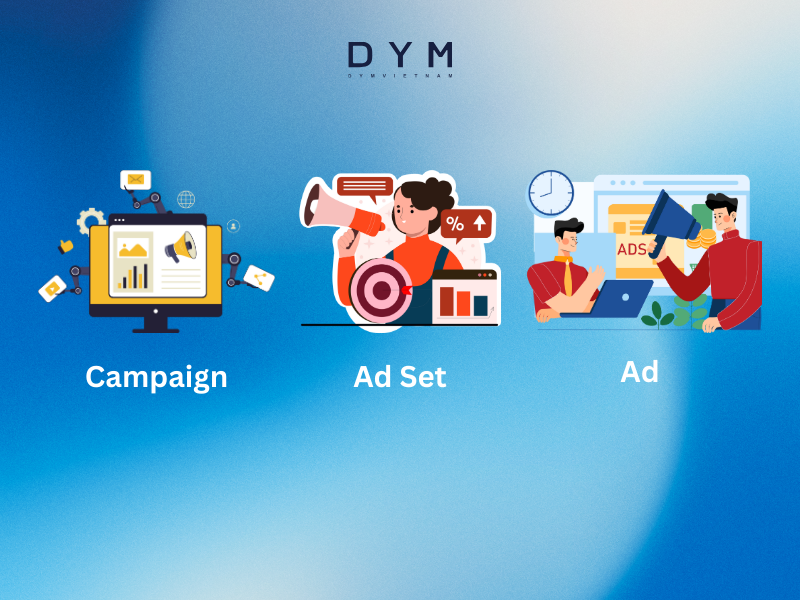
Before running ads, you need to understand the three basic levels:
Campaign
→ Choose an objective:
- Awareness
- Traffic
- Engagement
- Leads
- Sales (Conversions / Purchases)
Ad Set
→ Set up:
- Audience
- Budget
- Schedule
- Placements
- Optimization & Deliver
Ad
→ Design:
- Images / Videos
- Ad copy (text)
- Headline
- Call-to-Action (CTA) button
Understanding these three levels clearly helps you know exactly where to optimize when results are not performing well.
Preparation Before Running Facebook Ads
Before clicking the “Publish” button, you need:
- An active Fanpage with basic content
- A website or landing page (if running conversion/sales campaigns)
- Facebook Business Manager (business account)
- Ads Manager
- Facebook Pixel / Conversions API installed (for conversion campaigns)
If you only boost posts directly from the Page without using Ads Manager, you will be limited in many advanced technical features.
Liên hệ DYM VIETNAM ngay! Contact DYM VIETNAM here!
Choose the Right Objective from the Start
This is a very important step — Facebook will optimize your ads based on the objective you choose.
Common objectives include:
- Traffic: drive users to your website or landing page
- Engagement: increase likes, comments, and shares
- Leads: collect forms directly on Facebook (Lead Ads)
- Sales / Conversions: optimize for purchase, registration, form submissions, etc.
Note:
If your goal is to generate orders or leads, prioritize Leads or Sales/Conversions instead of running Traffic campaigns only.

Ad Set Setup: Audience Targeting & Budget Techniques
Audience Selection
You can choose from:
Core Audience:
- Location: city, country, radius
- Age & gender
- Interests & behaviors
Custom Audience:
- People who have visited your website
- People who have watched your videos
- People who have engaged with your fanpage
- Uploaded customer lists (email addresses, phone numbers)
Lookalike Audience:
- Facebook finds people similar to your existing customers or audiences
Basic best practices:
- Avoid targeting too narrowly when starting out
(ideally from several hundred thousand to a few million people, depending on the industry) - Don’t stack too many conditions that make the audience too small
- Use Custom + Lookalike Audiences to improve audience quality once you have sufficient data
Budget & Schedule
There are two budget levels:
- CBO (Campaign Budget Optimization) – Budget is set at the Campaign level
- ABO (Ad Set Budget Optimization) – Budget is set at the Ad Set level
Beginners usually find ABO easier to control.
Technical tips:
- The minimum budget should be enough for each ad set to generate at least dozens of clicks or events per day
- Avoid turning ads on/off or making frequent edits within the same day (this affects the learning phase)
- When adjusting the budget, change less than 20–30% each time to avoid resetting the learning phase
Placements
You have two options:
- Automatic Placements – Facebook distributes ads automatically
- Manual Placements – Manually select placements such as News Feed, Instagram Feed, Stories, Reels, etc.
Recommendations:
- Beginners → use Automatic Placements so the system can test and optimize
- Once you have data → you can remove low-performing placements
(e.g. Audience Network if it’s not effective or necessary)
Creating Ads: Content & Creative Techniques
A standard Facebook ad includes:
- Media: images / videos
- Primary Text (Caption)
- Headline
- Description (short description – optional)
- CTA (Call to Action): Shop Now, Sign Up, Learn More, etc.
Images / Videos
- High resolution and clear visuals
- Avoid too much text on images
- Videos should get straight to the main message within the first 3–5 seconds
- Prioritize real images/videos over overly “stock” content
Caption Content (Caption)
An effective caption usually includes:
- Call out the right audience: “For those who…”, “If you’re…”
- Highlight the problem: pain points or needs
- Present the solution: your product or service
- Emphasize key benefits (USP)
- Add trust signals: reviews, number of customers, warranty, etc.
- Clear call to action (CTA)
Install Pixel & Track Conversions (Mandatory for Performance Campaigns)
This is a step that many people overlook.
Installing the Facebook Pixel
- Set it up via Facebook Events Manager
- Add it to your website by:
- Installing the script code directly
- Using Google Tag Manager
Event Setup
Some common events include:
- ViewContent – page views
- AddToCart – add to cart
- Lead – form submission
- Purchase – completed purchase
When events are set up, you can:
- Optimize campaigns based on conversion events
- Create remarketing audiences
- Build lookalike audiences from high-quality customer data
Measuring & Optimizing Facebook Ads
Metrics You Should Track
- Impressions – number of times your ad is shown
- Reach – number of people reached
- CTR (Click-Through Rate) – click-through rate
- CPC (Cost Per Click) – cost per click
- CPM (Cost per 1,000 impressions)
- Conversions / Results – number of leads or orders
- CPA (Cost Per Action) – cost per conversion
Basic Optimization Directions
- Low CTR → creatives or ad copy are not attractive enough, or targeting is not accurate
- High CPC → high competition or weak ad creatives
- Many clicks but few leads → issues with the landing page or form
- Very high CPM → audience is too narrow or content quality is low
A/B Testing
Test each element individually:
- Test the audience
- Test images vs. videos
- Test caption A/B
- Test pricing, offers, and CTAs
Only test one main variable at a time to clearly identify what performs better.
Conclusion
“Running Facebook Ads” from a technical perspective is not just about clicking the Create Campaign button—it is a structured process that includes:
- Defining the right objective
- Setting up a proper Campaign – Ad Set – Ad structure
- Choosing the right audience and budget
- Creating insight-driven and compelling creatives
- Installing the Pixel and tracking conversions
- Continuously analyzing data and optimizing performance
DYM VIETNAM’s “Facebook Advertising Management Service” page here.


Mục Lục Table of content